Quick Answer
Technical SEO | On-Page SEO | |
Focus | Site infrastructure & crawlability | Content & HTML elements per page |
Controls | Speed, indexing, mobile, schema, site architecture | Titles, headings, keywords, content, images |
Fixes | Site-wide issues (one fix, many pages benefit) | Page-by-page issues (fix each page individually) |
Time to see impact | Can be fast (fixing a crawl block) or slow (Core Web Vitals) | Usually 4–12 weeks after publishing/updating |
Skips it and… | Pages may never get indexed at all | Pages get indexed but don’t rank for the right terms |
Owned by | Developer / technical SEO specialist | Content writer / SEO strategist |
Technical SEO makes your site crawlable and fast; on-page SEO makes your content relevant and clickable. Neither ranks a page alone – a technically perfect page with thin content won’t rank, and great content on a slow, broken site won’t get crawled long enough to matter. If you’re starting from zero, fix technical issues first (they block everything else), then layer on-page optimization on top.Most sites don’t have a “technical SEO problem” or an “on-page SEO problem” – they have both, in different proportions. The real skill is knowing which one is currently the bottleneck.
What Is Technical SEO?
Technical SEO is everything that determines whether Google can find, crawl, render, and index your pages in the first place – before your content even gets evaluated. Site speed, mobile usability, XML sitemaps, robots.txt rules, canonical tags, HTTPS, structured data, and crawl budget all live here.
Here’s the part most guides skip: technical SEO isn’t a one-time setup. A site that passed every technical audit in January can fail Core Web Vitals in June just from adding a new tracking script or a heavier plugin. Technical SEO is closer to infrastructure maintenance than a checklist you complete once.
What Is On-Page SEO?
On-page SEO is everything you control on an individual page to make it relevant to a specific search query and satisfying to the person reading it – content quality, title tags, headers, keyword usage, internal links, and images.
If technical SEO answers “can Google reach this page?”, on-page SEO answers “should this page rank for what someone searched?” Both questions have to be answered “yes” for a page to actually perform.
On-Page vs Technical SEO: The Core Difference
Think of it like a store. Technical SEO is the building – the doors that open, the lights that work, the aisles that aren’t blocked. On-page SEO is what’s actually on the shelves – whether the products match what the customer walked in looking for.
A customer can’t buy anything if the door is locked (technical SEO fails). But an open store with empty shelves doesn’t get repeat visitors either (on-page SEO fails). Google, in this analogy, is a customer that also happens to be grading the store on both.
Technical SEO Checklist
Crawlability & indexing
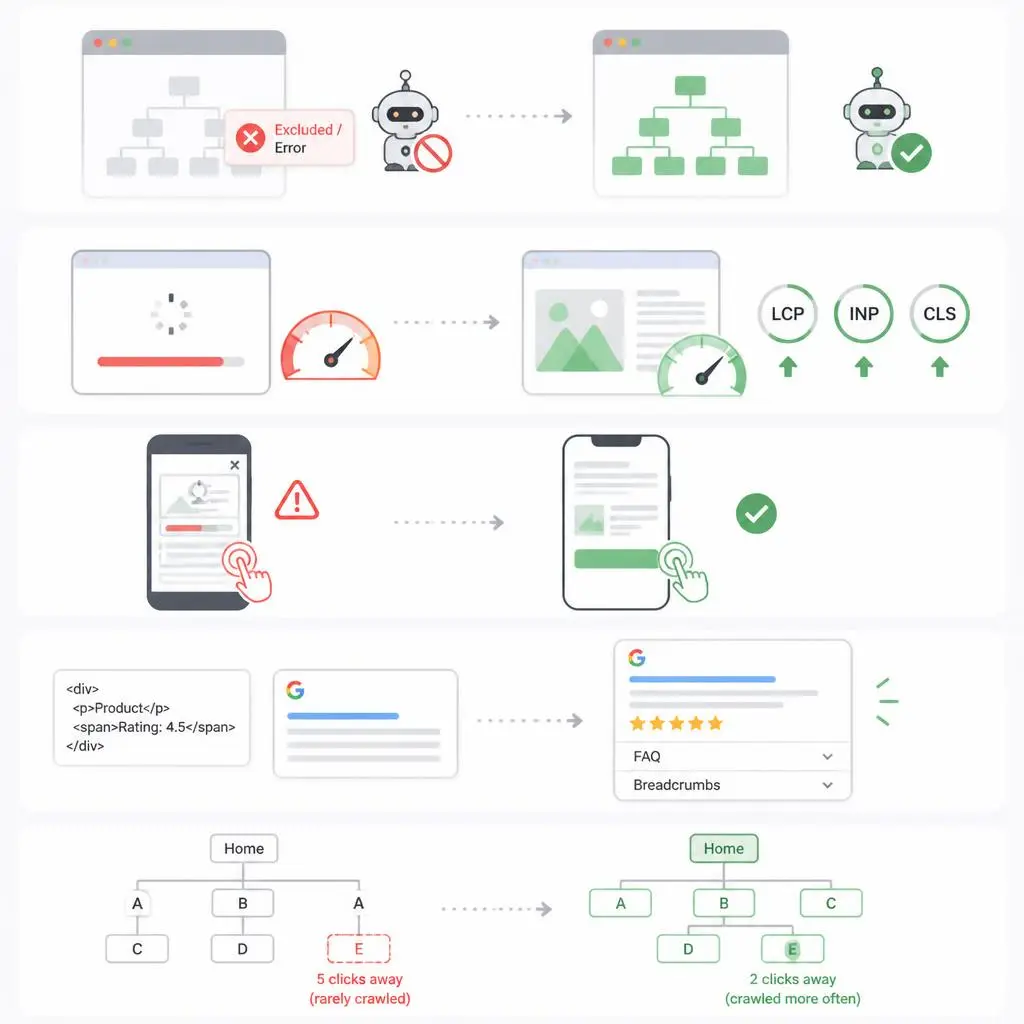
Google can only rank what it can find. Check Google Search Console’s Coverage report for “Excluded” or “Error” pages – a mis-set noindex tag or a blocked robots.txt rule can quietly keep entire sections out of search for months without any visible symptom on the site itself.
Site speed & Core Web Vitals
LCP (loading), INP (interactivity), and CLS (visual stability) are direct ranking signals. In practice, the biggest wins usually come from image compression and reducing unnecessary JavaScript – not exotic fixes.
Mobile responsiveness
Google indexes the mobile version of your site by default (mobile-first indexing). If your mobile experience is worse than desktop – smaller tap targets, content that shifts, intrusive pop-ups – that’s what’s being evaluated, not your desktop version.
Structured data (schema)
Schema doesn’t directly boost rankings, but it’s how you earn rich results – star ratings, FAQ dropdowns, breadcrumbs – that increase click-through rate even at the same ranking position. FAQ schema in particular has become a strong lever for AI Overview and featured snippet inclusion.
Site architecture & internal linking (technical layer)
How pages connect to each other affects how crawl budget gets distributed. A page buried 5 clicks from the homepage gets crawled far less often than one linked from your main navigation.
On-Page SEO Checklist
Search intent & content quality
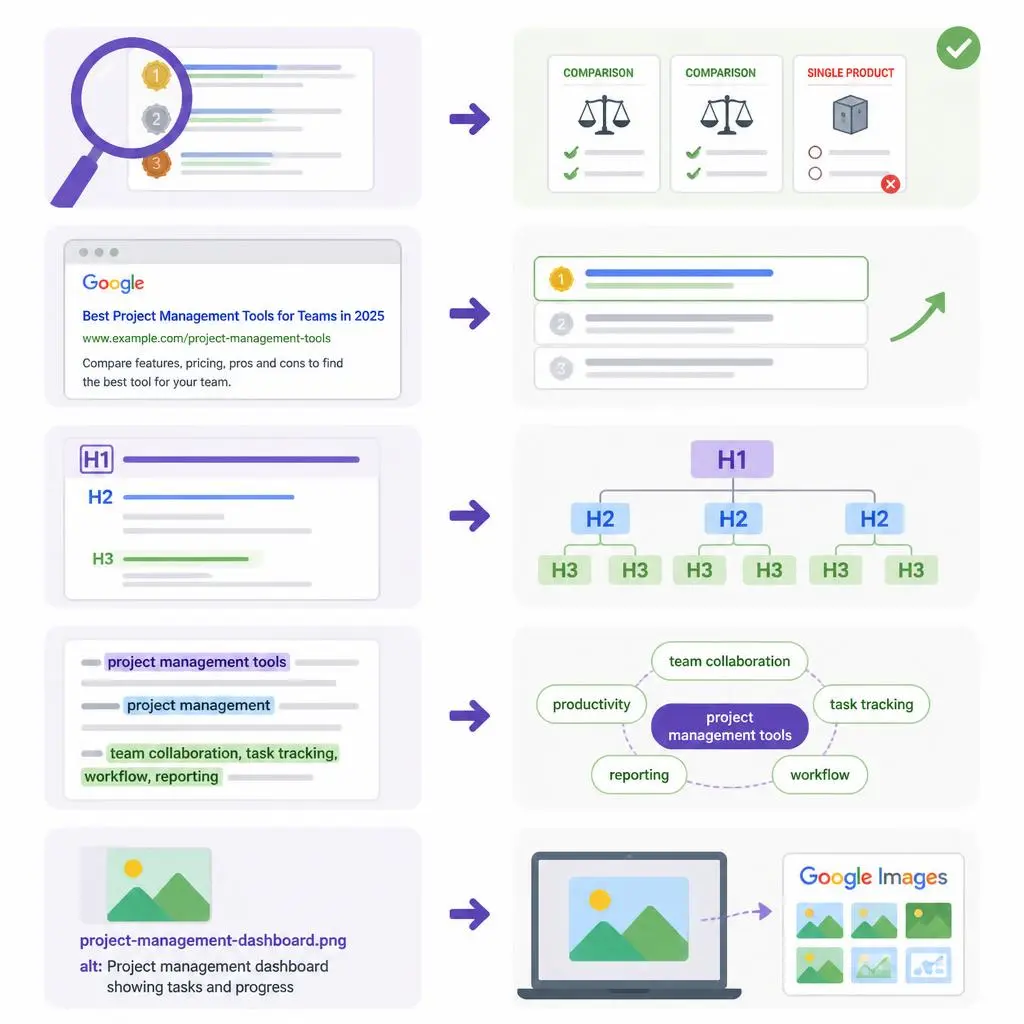
Before writing a word, check what’s currently ranking for the target keyword. If the top 10 results are all comparison articles and you publish a single-product review, intent mismatch will cap your ranking regardless of writing quality.
Title tags & meta descriptions
The title tag is a ranking factor and a click-through factor simultaneously – it needs the keyword naturally placed, and it needs to make someone want to click over the other 9 results.
Header structure (H1–H3)
One H1 per page. H2s and H3s should map to the actual subtopics someone searching that keyword would expect answered – this is also what AI Overviews and featured snippets tend to extract from.
Keyword placement (without stuffing)
Primary keyword in the title, first 100 words, one H2, and the URL is usually enough. Beyond that, semantic variations and related terms matter more than repeating the exact phrase.
Image optimization
Descriptive file names and alt text aren’t just accessibility – alt text is one of the few places Google gets explicit text context about a visual element, and it’s an easy source of image-search traffic that most competitors skip entirely.
Which Should You Fix First? (A Decision Framework)
1. Pages not indexed at all, or indexed but never appearing in search → technical SEO first. Content quality is irrelevant if the page isn’t in the index.
2. Pages indexed and ranking, but stuck on page 2–3 → on-page SEO first. Google can already find and evaluate the page; it’s a relevance/quality gap now.
3. Site loads slowly (3+ seconds) or fails Core Web Vitals → technical SEO first, even if content looks fine. Speed affects every single page at once, so it’s the highest-leverage fix available.
4. New site, nothing published yet → build both simultaneously. Set up technical fundamentals (sitemap, HTTPS, mobile-friendly theme) while writing the first batch of on-page-optimized content – don’t sequence them.
Real-World Example: Same Content, Different Technical Health
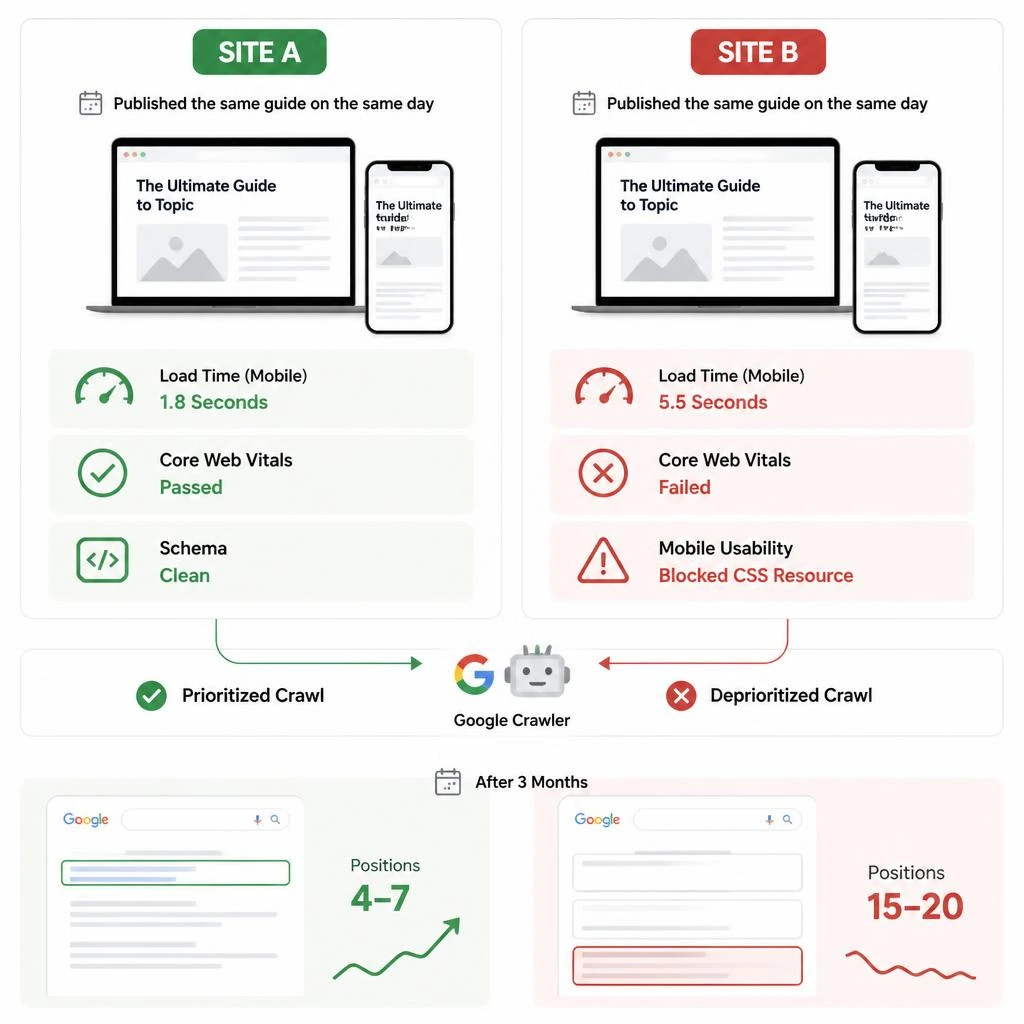
Picture two sites publishing the identical 2,000-word guide on the same day, same keyword targeting, same on-page optimization.
Site A loads in 1.8 seconds, passes Core Web Vitals, has clean schema. Site B loads in 5.5 seconds on mobile and has a blocked CSS resource flagging mobile usability errors in Search Console.
Three months later, Site A is sitting in positions 4–7. Site B – same content, same keyword work – is stuck around position 15–20, because Google’s crawler is deprioritizing a site it has flagged as a poor mobile experience. The content did its job. The technical foundation didn’t let it show.
Common Myths About Technical vs On-Page SEO
“Technical SEO is a one-time setup.” It isn’t. Plugin updates, theme changes, and new scripts can silently break things that were fine last quarter. Recheck Core Web Vitals and Search Console coverage on a recurring schedule, not just at launch.
“More keywords in the content = better on-page SEO.” Keyword density stopped being a meaningful ranking factor years ago. Modern on-page SEO is about topical coverage and matching intent, not repetition count.
“If Google indexed it, technical SEO is done.” Indexing is the minimum bar, not the finish line. A page can be indexed and still be actively held back by slow load times or poor mobile usability.
How They Work Together (Not Against Each Other)
Neither discipline outranks the other on its own – they compound. A technically fast, well-structured site gives your content more chances to be crawled, evaluated, and re-evaluated as you improve it. Well-optimized content gives your technical investment something worth ranking. Sites that treat this as an either/or decision consistently plateau below sites that treat it as one connected system.
Tools for Each
For technical SEO: Google Search Console (indexing/coverage errors), PageSpeed Insights or Lighthouse (Core Web Vitals), Screaming Frog (site-wide crawl audits), Schema Markup Validator (structured data checks).
For on-page SEO: Google Search Console (query-level performance, which pages are close to page 1), a keyword tool like Ahrefs or Semrush (intent and volume research), and a plain SERP scan of the top 10 results for your target keyword before you write a word.
Conclusion
The “technical SEO vs on-page SEO” framing is useful for understanding what each one actually does – but it’s the wrong lens for deciding what to work on. The real question isn’t which one matters more; it’s which one is currently your bottleneck. A site with crawl errors needs technical work before content work will show any return. A site that’s fast, indexed, and still stuck on page 2 needs content and on-page work, not another speed audit. Diagnose the bottleneck first, then fix that one – the other will need attention eventually too, but rarely at the same time.
If you’d rather have this diagnosed and fixed for you, our SEO services cover both technical and on-page work under one roof. Take a look at Zebuck, or contact us and we’ll tell you straight which one your site needs first.
FAQs
What is the difference between technical SEO and on-page SEO?
Technical SEO controls whether Google can crawl, render, and index your site (speed, mobile, structure). On-page SEO controls whether individual pages are relevant and well-optimized for a specific search query (content, titles, headers, keywords).
Which is more important for a new website?
Technical SEO matters first in the sense that it’s a gate – if pages aren’t indexed, nothing else matters. But you should build both together from day one rather than fully finishing one before starting the other.
Can good content rank without technical SEO?
It can rank for less competitive terms, but it will consistently underperform its potential – slow load times and poor mobile usability actively suppress rankings even for genuinely strong content.
How often should I audit technical SEO?
Every 3 months at minimum, and immediately after any major site change – theme update, migration, or new plugin installs that could affect speed or crawlability.
Does on-page SEO include internal linking?
Internal linking has both an on-page component (which anchor text and pages you choose to link) and a technical component (how crawl budget flows through the site). It sits at the overlap of the two.
What ranks faster – fixing technical SEO or improving on-page content?
Technical fixes can show impact within days to weeks (especially unblocking a crawl issue). On-page content improvements typically take 4–12 weeks to reflect in rankings as Google re-crawls and re-evaluates the page.
Do I need a developer for technical SEO?
For basics – sitemaps, redirects, meta tags – most modern CMS platforms and SEO plugins handle it without code. Core Web Vitals fixes, schema implementation, and site architecture changes usually do need developer involvement.
Is Core Web Vitals part of technical SEO or on-page SEO?
Technical SEO. It measures site performance (loading speed, interactivity, visual stability) – infrastructure, not content or page elements.