
Quick Answer
Affordable website maintenance for a small business in 2026 typically costs between $20–$60/month for DIY tools, $50–$150/month for freelance support, and $50–$500+/month for a fully managed plan. The right choice depends on how much time you have, how technical you are, and how much downtime your business can actually afford. For most small businesses running WordPress, a managed plan in the $50–$150/month range covers backups, updates, security, and speed – without eating a full day of your week.
Quick Summary Table
Option | Monthly Cost | Best For |
DIY Management | $20–$60 | Owners with time and basic technical comfort |
Freelance Support | $50–$150 | Occasional fixes, no recurring plan needed |
Managed Maintenance Plan | $50–$500+ | Businesses that can’t afford downtime |
Website maintenance isn’t glamorous. Nobody starts a business dreaming about plugin updates or backup schedules. But here’s the thing – a website that isn’t maintained doesn’t just look outdated, it becomes a liability. Slow load times cost you customers. Unpatched plugins invite hackers. A missed backup can mean losing years of content in one bad update.
The good news? You don’t need a $500/month enterprise package to keep a small business site healthy. You need to know what actually matters, what’s optional, and where “affordable” quietly turns into “cutting corners.”
What Is Website Maintenance, Really?
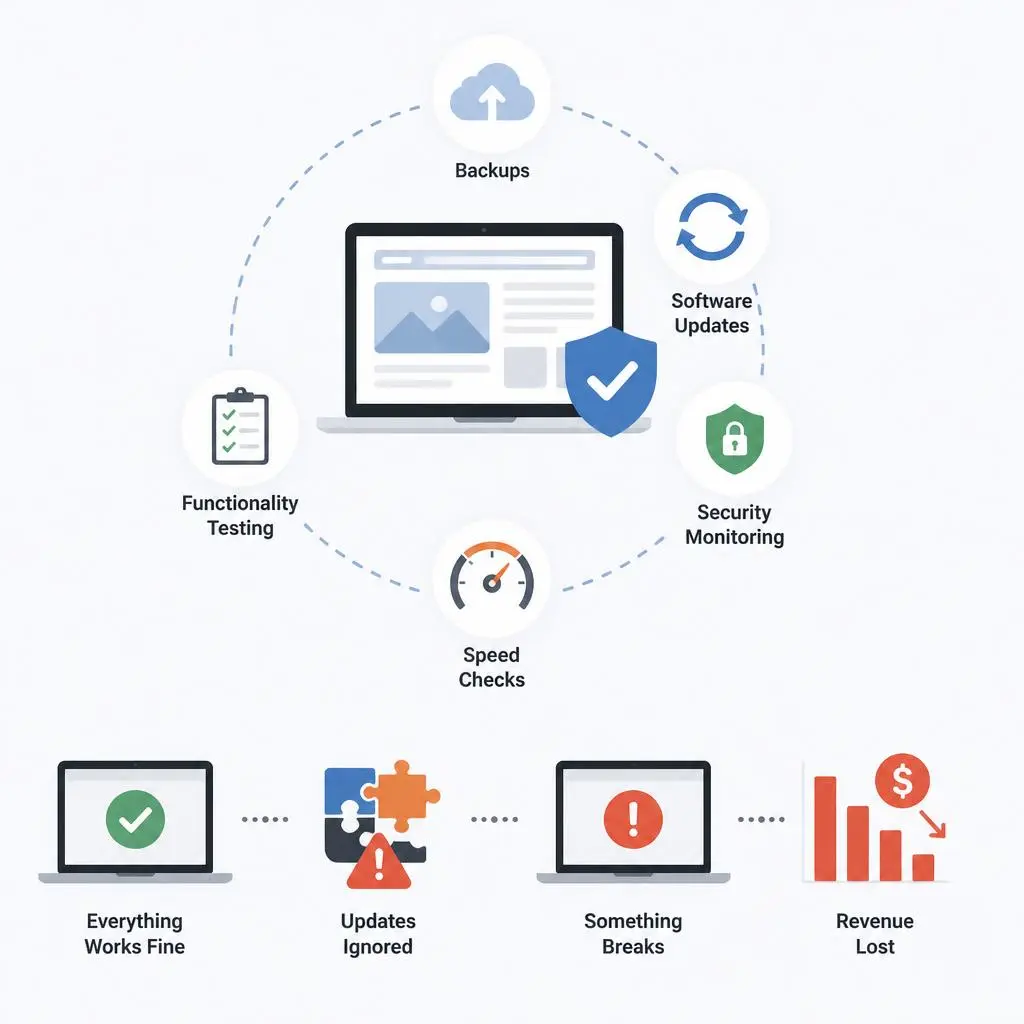
Website maintenance is the ongoing work that keeps your site running, secure, and fast – after it’s already built. It’s easy to think of a website as a one-time project: build it, launch it, done. In practice, a website is closer to a car. You don’t just drive it off the lot and forget about oil changes.
What “maintenance” actually covers
At a baseline, maintenance means:
- Backups – regular copies of your site saved somewhere safe, so a bad update or hack doesn’t wipe out years of work
- Software updates – your CMS (like WordPress), themes, and plugins all release security patches that need installing
- Security monitoring – scanning for malware, checking your SSL certificate is active, watching for suspicious login attempts
- Speed checks – making sure pages still load fast as you add content, images, and plugins over time
- Functionality testing – confirming contact forms, checkout flows, and buttons still work after updates
What happens if you skip it
I’ve seen small business owners go 8-10 months without a single plugin update because “the site was working fine.” Then one day, a plugin conflict breaks the checkout page during a weekend sale. No one notices until Monday. That’s real revenue gone – not a hypothetical.
Skipped maintenance rarely fails loudly at first. It fails quietly, then all at once.
How Much Does Website Maintenance Cost in 2026?
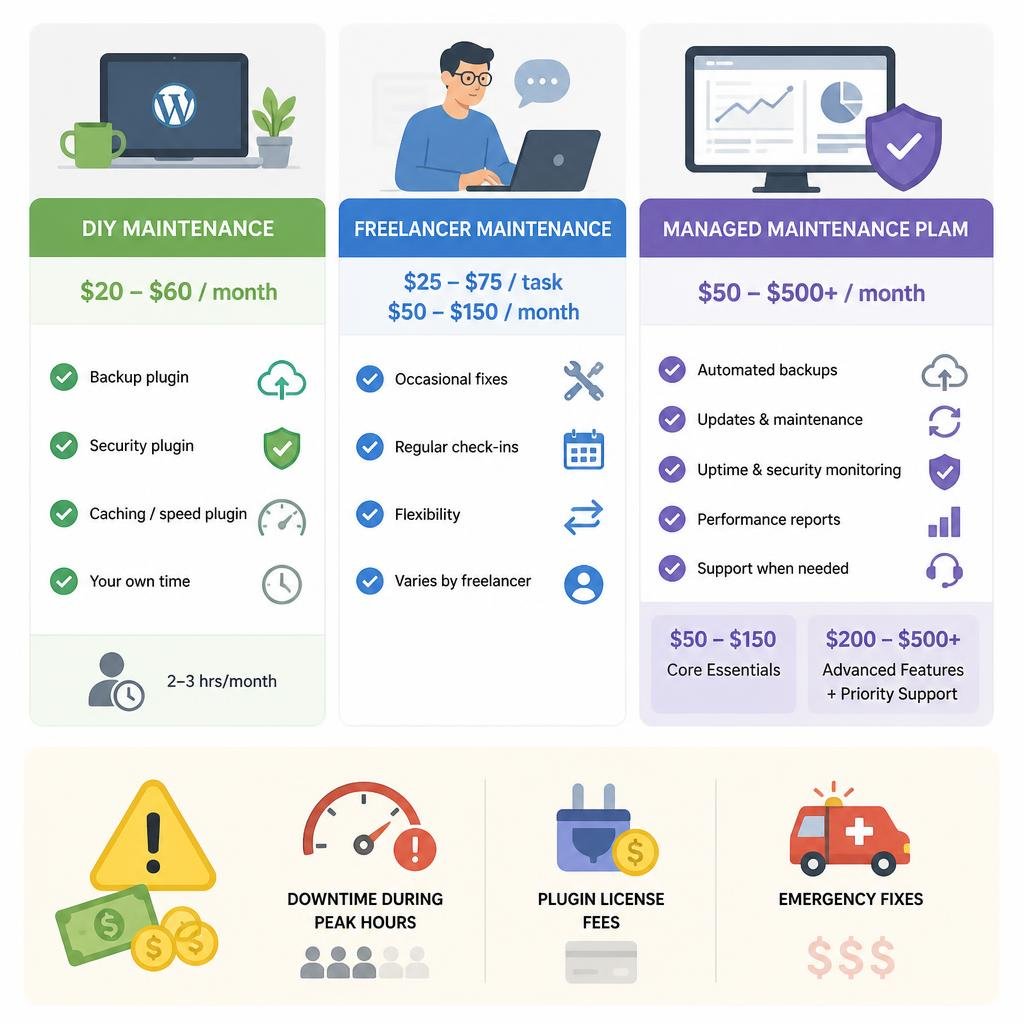
This is the part most guides gloss over. Here’s a realistic breakdown.
DIY maintenance costs
If you’re comfortable logging into WordPress yourself, DIY maintenance runs $20–$60/month. This usually covers:
- A backup plugin (UpdraftPlus, WP Vivid) – often free or ~$5/month for cloud storage
- A security plugin (Wordfence, Sucuri basic tier) – free to ~$10/month
- A caching/speed plugin – mostly free
- Your own time – which is the real cost here
DIY works if you have 2-3 hours a month to spare and don’t panic when something breaks.
Freelancer maintenance costs
Hiring a freelancer for occasional fixes typically runs $25–$75 per task, or a light retainer around $50–$150/month if you want someone checking in regularly. This is a middle ground – you’re not paying for a full agency, but you’re also not doing it yourself.
The tradeoff: freelancers vary wildly in reliability. Good ones are worth every dollar. Inconsistent ones leave you worse off than DIY.
Managed maintenance plans
A managed plan from an agency runs $50–$500+/month, depending on scope. At the affordable end ($50-$150/month), you typically get:
- Automated weekly or daily backups
- Core, theme, and plugin updates
- Uptime and security monitoring
- Monthly performance reports
- A support contact when something breaks
Higher tiers ($200-$500+) usually add priority response times, staging environments for testing updates before they go live, and dedicated speed optimization.
Hidden costs nobody warns you about
- Downtime during peak hours – cheap plans sometimes schedule updates without checking your traffic patterns
- Plugin licensing fees – premium plugins (page builders, SEO tools) often have their own annual renewal, separate from your maintenance plan
- Emergency fixes – some “affordable” plans exclude urgent fixes and charge extra when something breaks outside scheduled maintenance
What’s Included in an Affordable Maintenance Plan
Non-negotiables (every plan needs these)
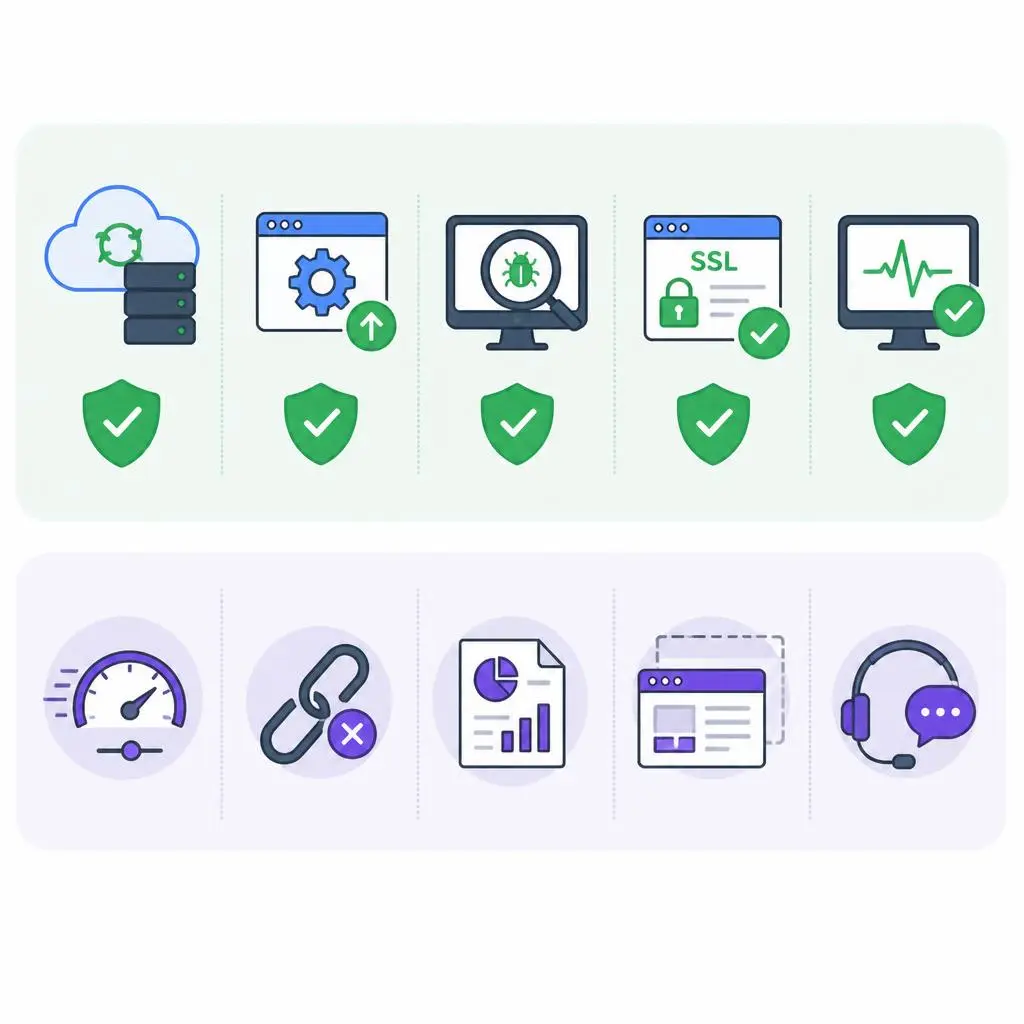
No matter your budget, these five things should be covered:
- Automated backups (at least weekly)
- Core software and security updates
- Malware scanning
- SSL certificate monitoring
- Basic uptime monitoring
If a “maintenance plan” doesn’t include all five, it’s not really a maintenance plan – it’s a partial one.
Nice-to-haves that vary by budget
- Speed optimization (image compression, caching configuration)
- Broken link checks
- Monthly reporting
- Staging site for testing changes safely
- Priority support response time
WordPress-Specific Maintenance Small Businesses Overlook
Since most small business sites run on WordPress, there are a few WordPress-specific issues generic maintenance advice doesn’t cover.
Plugin conflicts and update timing
Not all updates should happen at once. Updating five plugins simultaneously makes it hard to identify which one broke your site if something goes wrong. A good maintenance process updates in small batches and tests functionality after each one – not all at once on autopilot.
Database bloat
WordPress databases accumulate junk over time: post revisions, spam comments, expired transients. Left unchecked for a year or two, this can noticeably slow your site down. A quarterly database cleanup is a small task that most “affordable” plans skip entirely, even though it takes minutes and meaningfully affects speed.
DIY vs Freelancer vs Managed Service – Which Fits Your Business?
Factor | DIY | Freelancer | Managed Plan |
Time required | High | Low-Medium | Very Low |
Technical skill needed | Medium-High | Low | None |
Cost predictability | Low (time cost hidden) | Medium | High |
Response time on issues | Depends on you | Varies | Usually fastest |
Best for | Solo owners, tight budgets | Occasional needs | Businesses that can’t afford downtime |
If your website directly drives revenue – bookings, sales, leads – the cost of a managed plan is usually smaller than the cost of even one day of downtime.
How to Pick an Affordable Plan Without Getting Burned
Red flags in “cheap” maintenance offers
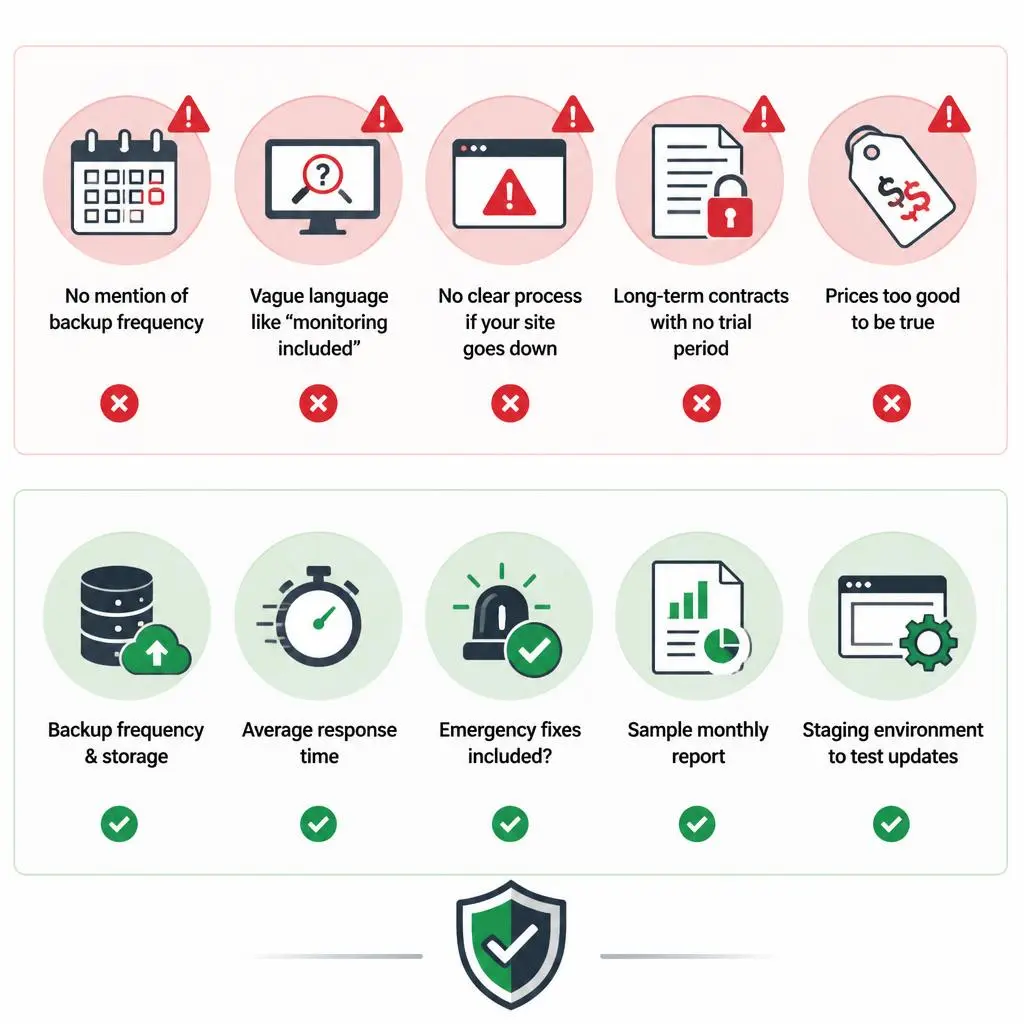
- No mention of backup frequency (ask specifically – “regular backups” can mean monthly)
- Vague language like “monitoring included” with no detail on what’s monitored
- No clear process for what happens if your site goes down
- Contracts that lock you in for 12+ months with no trial period
Questions to ask before signing up
- How often are backups taken, and where are they stored?
- What’s your average response time if my site goes down?
- Are emergency fixes included, or billed separately?
- Can I see a sample monthly report?
- Is there a staging environment to test updates first?
A provider that can’t answer these clearly isn’t ready to maintain a live business website.
A Simple Monthly Maintenance Checklist You Can Follow Yourself
If you’re going the DIY route, here’s a practical monthly routine:
- Run a full site backup and confirm it’s stored off-site
- Update WordPress core, theme, and plugins one at a time
- Run a malware scan
- Check SSL certificate status
- Test your contact form and any checkout/booking flow
- Check page speed (Google PageSpeed Insights)
- Review broken links
- Check for spam comments or suspicious login attempts
Set a recurring calendar reminder. The businesses that stay on top of this consistently are rarely the ones dealing with a 2 AM “the site is down” panic.
Real-World Example: What Happens When Maintenance Is Ignored
A small local service business once went almost a year without updating their contact form plugin. It quietly stopped sending email notifications after an unrelated update – no error message, nothing visibly broken on the front end. The form still submitted, customers still filled it out, but the business owner simply stopped receiving the leads. They only found out three months later when a customer called asking why nobody had followed up.
That’s the real cost of skipped maintenance. It’s rarely a dramatic crash. It’s usually something quiet, working in the background, silently costing you business until someone happens to notice.
Conclusion
The honest framing is this: DIY maintenance works when you have the time and the stomach for troubleshooting your own site at 11 PM. Managed maintenance is what you buy once your website stops being a side task and starts being where actual revenue happens. Don’t overpay for a plan stacked with extras you’ll never touch – but don’t cut corners on backups and security just to save $30 a month either. Get that balance wrong and you’re either paying for complexity you don’t need, or gambling your site on a plugin update nobody checked.
If you’re not sure whether your business needs a full managed plan or just a tighter DIY routine, that’s worth a real conversation rather than a guess – visit zebuck.com to see how we approach this, explore our services or Contact us and we’ll help you figure out what actually fits.
FAQs
- What is the average cost of website maintenance for a small business?
Most small businesses pay between $50-$150/month for a managed maintenance plan, or $15-$60/month for DIY tools if managing it themselves. - Is website maintenance really necessary if my site “works fine”?
Yes. A site working fine today doesn’t mean it’s secure or backed up. Most maintenance failures – hacks, crashes, lost data – happen suddenly, not gradually. - How often should a WordPress site be updated?
Core software should be updated as soon as security patches release. Plugins and themes are typically safe to update monthly, in small batches rather than all at once. - Can I do website maintenance myself without technical skills?
Basic tasks like backups and plugin updates are manageable with beginner-friendly tools. More technical issues – malware removal, database cleanup, conflict troubleshooting – usually need professional help. - What’s included in a typical affordable maintenance plan?
At minimum: backups, security updates, malware scanning, SSL monitoring, and uptime checks. Anything less isn’t full maintenance. - How do I know if a “cheap” maintenance plan is actually reliable?
Ask specific questions about backup frequency, response times, and whether emergency fixes are included. Vague answers are a warning sign. - Does website maintenance improve SEO?
Indirectly, yes. Site speed, uptime, and security are all factors search engines consider. A well-maintained site avoids the crashes and slowdowns that hurt rankings. - What happens if I skip maintenance for too long?
Risks build up quietly – outdated plugins become security holes, database bloat slows load times, and a single bad update without a recent backup can mean losing content permanently.